
RAMen on ChatGPT, Gemini and more.
Your memory and Endless on ChatGPT, Claude, Gemini and more, including sites that cannot take a connector. And Detail Lock keeps the details you set in a long chat.
Part of your RAMen plan ✦ One account for every way in
All of RAMen, right in the chat.
One add-on for the AI websites below, including the ones that cannot take a connector, like Gemini, Copilot, DeepSeek, Meta AI, Poe and Qwen.

Detail Lock
Keeps the details you set in a chat, and flags any it sees an answer drop.

RAMen Memory
What you told any of your AIs, on each of these sites, with receipts.

RAMen Endless
Long chats keep their thread, from one site to the next.
- ChatGPT
- Claude
- Gemini
- Grok
- Perplexity
- Copilot
- DeepSeek
- Mistral
- Meta AI
- Poe
- Qwen
Long chats forget. Detail Lock keeps a list.
After a few messages, AIs start to drop the limits, names and rules you gave them. Detail Lock writes them down and carries them in your messages.
It keeps a list
As you chat, it writes down the limits, names, dates and rules it finds in your messages, and things to leave out. Pin, edit, remove or add any of them.
Your messages carry it
Once the chat is too long for the AI to see it all, the list goes along with every message you send. You can choose always or never instead.
It checks each answer
It checks the details it can, like limits, names and things to leave out, and tells you when it sees an answer drop one. Remind it puts a short reminder in the message box.
Or start fresh with everything
One click opens a new chat with your goal, every detail and the last answer in one message. Nothing is sent until you press Send.
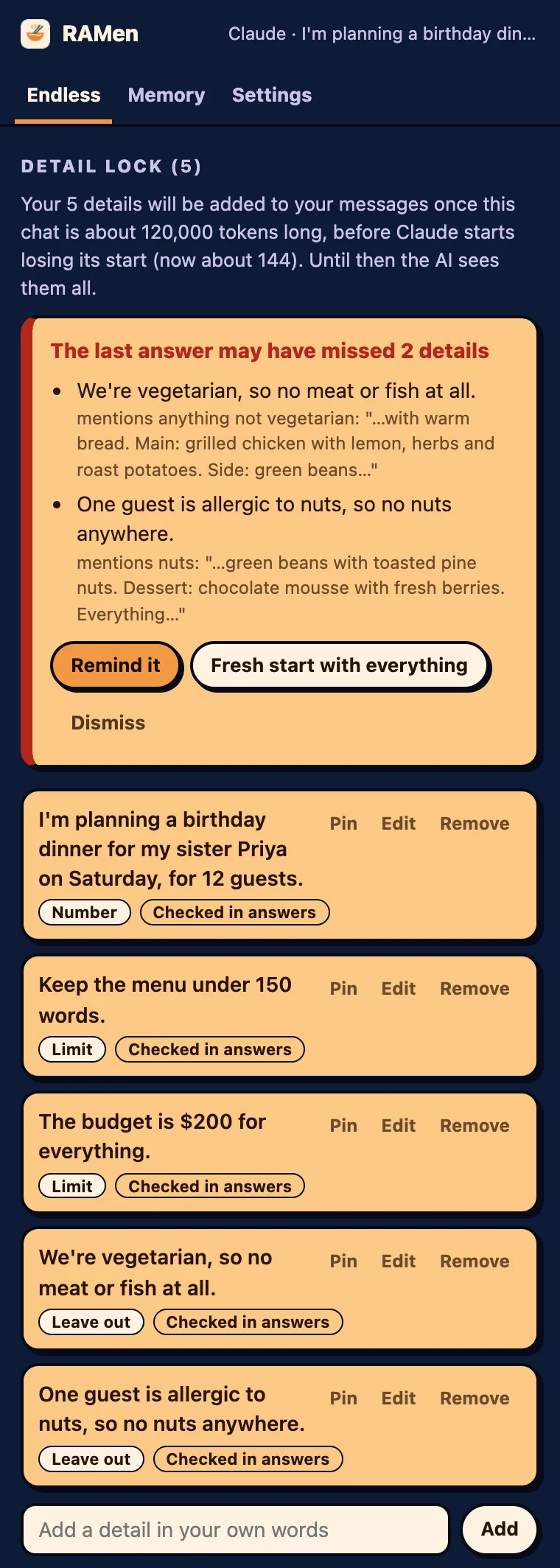
The add-on after a sample chat about a dinner party.
What stays where, plainly.

Detail Lock stays in your browser
Each chat's details, the AI's last answer, your settings and your RAMen sign-in are kept in your browser on this computer. They go to RAMen only when the add-on saves a long chat to your own RAMen, every 15 messages, while "Save long chats as they go" is on. Privacy

Your RAMen account
Your memory and Endless come from your RAMen account, the same one you use in Claude and ChatGPT. What you save or search here goes to that account.
Smarter checks, if you like
Detail Lock's own rules check limits, names, things to leave out, units, years and tables. Turn on smarter checks and Chrome's built-in AI, or RAMen Desktop on this computer, looks at the rest.

Good to know.
What does it read?
Only the AI websites listed above. It reads your messages to find the details you set, and the AI's answers to check them.
Does Detail Lock send anything anywhere?
It adds your list to the messages you send, on the site you are using. And every 15 messages it saves the chat (its goal, details, to-dos and the AI's latest answer) to your own RAMen, so you can continue it in any app. Turn that off with "Save long chats as they go" in the add-on's Settings or on your RAMen page.
How does my memory get there?
Through your RAMen account, the same one you use in Claude and ChatGPT. The notes and saved chats from there are here on each of these sites, and what you save here is there too.
Can I choose when it adds the list?
Yes. In its Settings: when the chat is too long for the AI to see it all (the setting at first), always, or never. You can also turn the checks off.
What is "Fresh start with everything"?
A new chat with your goal, every detail and the AI's last answer in one message, ready for you to read over and send.
Do I need the connector too?
No. The add-on works on its own in Chrome. The connector brings RAMen to Claude's and ChatGPT's own apps, on your desktop and phone. One plan covers both.
Do I need a RAMen account?
Yes. Detail Lock, your memory and Endless come with the RAMen plan and its 14-day trial: sign in once with your RAMen license key.
Which browsers?
Chrome on a computer.
RAMen for Chrome.
The RAMen add-on is waiting for its place in the Chrome Web Store, so you cannot add it yet. Leave your email and we will tell you when it is there.